Snorby: A Playful Font with Pitfalls to Avoid
What Makes Snorby Stand Out?
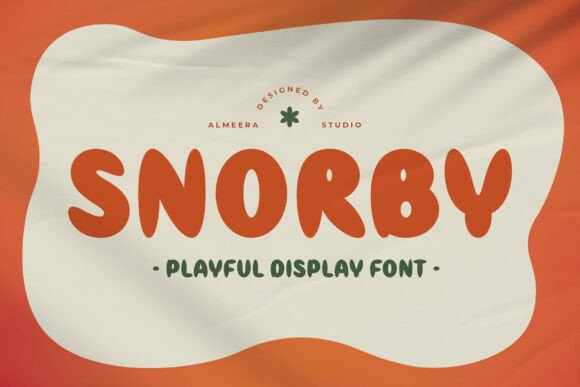
Snorby is a hand-drawn display font with soft curves and a cheerful personality. It’s designed to bring warmth and friendliness to visual projects, making it a popular choice for branding, packaging, children’s materials, and social media graphics. Its casual, approachable style helps creators connect with audiences in a lighthearted and engaging way.
Many designers and small business owners turn to Snorby when they want to evoke a sense of playfulness and authenticity. Whether it’s for a logo, a product label, or an Instagram post, Snorby adds a human touch that more formal fonts often miss.
Common Missteps When Using Snorby
Despite its charm, Snorby isn’t a one-size-fits-all solution. Like any design element, it has its limitations and potential pitfalls. Understanding these can help you use it more effectively and avoid costly design missteps.
Mistake 1: Using Snorby in Inappropriate Contexts
One of the most common errors is using Snorby for formal or professional applications. While it’s perfect for children’s books or casual branding, it may not be suitable for legal documents, corporate reports, or academic presentations.
Why it matters: Mismatched typography can confuse your audience or undermine your message. A law firm using Snorby on its website may appear unprofessional or unserious.
Better approach: Reserve Snorby for projects that benefit from its casual, friendly tone. Pair it with a clean sans-serif for contrast and balance when needed.
Mistake 2: Overlooking Licensing Details
Another frequent oversight is not checking the licensing terms before downloading or using Snorby. Some font versions are free for personal use but require a paid license for commercial applications.
Why it matters: Using a font without the correct license can lead to legal issues, especially if you're using it for a client or business project.
Better approach: Always verify the license type from the source. If you're unsure, contact the font creator or vendor for clarification. Choose platforms that clearly state usage rights, such as reputable font marketplaces.
Mistake 3: Assuming All Snorby Variants Are Equal
Snorby may come in different versions or weights, and not all are created equally. Some free versions may lack character sets, kerning adjustments, or stylistic alternates found in premium versions.
Why it matters: Limited character sets or poor spacing can cause issues in multilingual projects or when used across different platforms.
Better approach: Check the font's features before committing. Look for versions that include uppercase, lowercase, numerals, punctuation, and special characters. Test the font in your intended layout to ensure readability and consistency.
Mistake 4: Ignoring Readability at Small Sizes
Snorby is a display font, which means it’s best used at larger sizes where its playful details can shine. Using it in small text can make it hard to read and visually cluttered.
Why it matters: Poor readability can frustrate users and reduce the effectiveness of your message, especially in signage or mobile content.
Better approach: Use Snorby for headlines, titles, or short phrases. For body text or detailed information, pair it with a more legible font that complements its style without competing with it.
How to Choose the Right Snorby Version for Your Project
Selecting the right version of Snorby depends on your specific needs and usage. Here are a few things to check before downloading or purchasing:
- License type: Is it free for personal use only, or does it include commercial rights?
- Character set: Does it support the languages or symbols you need?
- Font weight and style: Are there bold, italic, or alternate versions available?
- Compatibility: Does it render well across devices and software platforms?
Also, consider where and how the font will be used. If you're designing for print, check how it looks in different color combinations and paper types. For digital use, test it on mobile and desktop screens to ensure clarity and consistency.
Pairing Snorby with Other Fonts
Snorby works best when paired with a more neutral font that balances its playful nature. Choosing the right companion font can enhance readability and visual harmony.
Avoid: Pairing Snorby with another decorative or script font, which can create visual noise and reduce clarity.
Try: Using Snorby with a simple sans-serif like Open Sans, Lato, or Roboto. These fonts provide contrast while maintaining a cohesive design style.
Real-World Examples of Snorby Done Right
Many small businesses and independent creators have successfully used Snorby to build a memorable brand identity. For example, a boutique ice cream shop used Snorby for its logo and social media headers, giving the brand a fun, approachable feel that resonated with families and young customers.
In contrast, a local bakery tried using Snorby for its menu and pricing tags but found that the font was too difficult to read from a distance. After switching to a cleaner font for body text and keeping Snorby for the shop name, the overall design improved significantly in both aesthetics and usability.
Final Thoughts: Make Snorby Work for You
Snorby is a versatile and expressive font that can elevate your design when used thoughtfully. By understanding its strengths and limitations, you can avoid common mistakes and make smarter design decisions.
Always test the font in your specific context, verify licensing terms, and pair it with complementary typefaces to ensure the best results. Whether you're a hobbyist, a small business owner, or a professional designer, Snorby can be a valuable tool in your creative toolkit—when used the right way.