Wonky Halloween: A Playful Font with a Spooky Twist – What You Need to Know
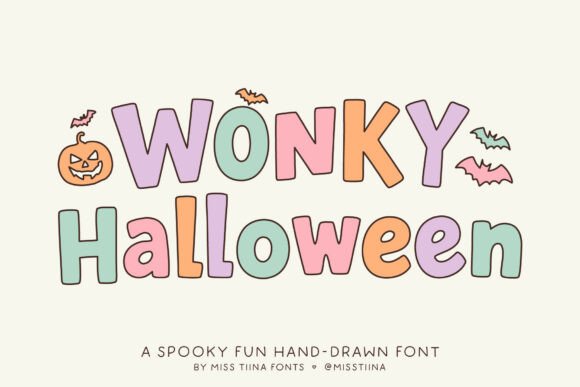
When it comes to Halloween-themed design projects, the right font can make all the difference. Wonky Halloween stands out as a fun, quirky, and hand-drawn typeface that captures the spirit of the season with a unique tilt and spooky charm. From party invitations to handmade crafts, this font brings a lively, slightly off-kilter aesthetic that’s both eye-catching and appropriate for the season. But while its playful nature is a big draw, there are some common pitfalls users should be aware of before diving in.
Understanding What Makes Wonky Halloween Unique
Wonky Halloween isn’t just another Halloween font—it’s designed with a deliberate irregularity that mimics hand-drawn lettering. This gives it a personal, whimsical touch that works well for informal or creative applications. The inclusion of themed dingbats like pumpkins and bats adds visual flair and makes it easy to integrate decorative elements directly into text-based layouts.
Designers and DIY enthusiasts love Wonky Halloween for its versatility. Whether you’re creating a trick-or-treat sign for your front door or designing digital graphics for a themed event, this font adapts well to both print and screen. However, its charm can also be a trap if used without consideration for context and readability.
1. Overusing It in Formal or Professional Contexts
One of the most frequent misuses of Wonky Halloween is applying it in contexts where a more polished or traditional font would be appropriate. While it’s perfect for party flyers and handmade cards, using it in business-related materials like event brochures or marketing emails can undermine professionalism.
Better approach: Reserve Wonky Halloween for informal or creative uses. For more structured designs, pair it with a clean sans-serif or serif font to maintain visual hierarchy and readability.
2. Ignoring Readability at Small Sizes
Due to its uneven baseline and decorative strokes, Wonky Halloween can become difficult to read when scaled down. This is especially problematic in printed materials like flyers or signage where legibility is crucial for conveying information quickly.
Better approach: Use this font for headlines and larger text elements. If you must use it for body text, test it at different sizes and ensure it remains clear and easy to read from a normal viewing distance.
3. Assuming It Works in All Design Software
While Wonky Halloween is typically available in common font formats like TTF and OTF, not all design tools handle hand-drawn fonts equally well. Some programs may not render the font correctly or may not support all its stylistic variations.
Better approach: Before committing to a project, test the font in your preferred software. If you’re working with a team or sharing files, confirm that all collaborators have access to the same font version to avoid inconsistencies.
4. Forgetting to Check Licensing Before Use
Many designers—especially beginners—download fonts without fully understanding the licensing terms. Some versions of Wonky Halloween may be free for personal use but require a paid license for commercial applications. Ignoring this detail can lead to legal issues or unexpected costs later on.
Better approach: Always read the license agreement before using a font for a client or commercial project. If you're unsure, reach out to the font creator or vendor for clarification.
How to Choose the Right Version of Wonky Halloween
Like many decorative fonts, Wonky Halloween comes in different variations and from different sources. Some are free, while others are premium versions with additional characters, alternate glyphs, or improved spacing. Choosing the right one depends on your specific needs and how you plan to use the font.
- Check for alternate characters: Some versions include stylistic alternates that give you more flexibility in design.
- Look for dingbat compatibility: If you want to use the themed icons, make sure the package includes them and that they’re easy to access.
- Verify cross-platform compatibility: If you’re using both Mac and Windows systems, test the font across both to ensure consistent rendering.
Using Wonky Halloween Effectively in Design Projects
When used correctly, Wonky Halloween can elevate your Halloween-themed designs and bring a sense of fun and spontaneity. Here are some practical tips to help you get the most out of this font:
- Pair it with complementary fonts: Use a simple sans-serif like Arial or Helvetica for supporting text to balance out the ornate style of Wonky Halloween.
- Limit its use to key elements: Let the font shine in headlines or call-out text rather than overusing it throughout the layout.
- Use it in seasonal branding: If you run a small business or blog, consider using Wonky Halloween for limited-time promotions or themed content during October.
Final Considerations Before Downloading or Buying
Before adding Wonky Halloween to your design toolkit, take a moment to evaluate your needs and the font’s suitability for your intended use. Ask yourself:
- Will this font be used for personal or commercial purposes?
- Do I need access to special characters or dingbats?
- Am I using design software that supports this font format?
- Is there a better alternative that offers similar style with improved readability?
By answering these questions ahead of time, you’ll avoid common frustrations and ensure your design work looks polished and professional—no matter how spooky it gets.
Conclusion: A Fun Font That Works Best with Care
Wonky Halloween is a great choice for anyone looking to inject some seasonal fun into their designs. Its quirky, hand-drawn style makes it stand out from more traditional fonts, and its thematic elements make it a joy to work with. However, like any decorative font, it requires thoughtful application to avoid common pitfalls. By understanding its limitations and using it strategically, you can make the most of this charming typeface and create Halloween-themed designs that are both effective and engaging.