Snackey: A Unique Display Font That Elevates Your Design Projects
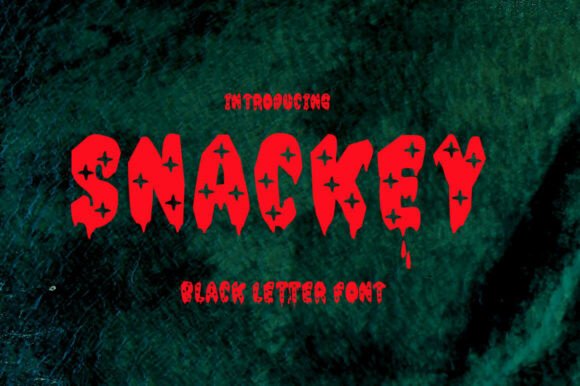
Snackey is not just another font—it’s a bold, expressive display typeface crafted to stand out. Whether you're designing a logo, a poster, or a website header, Snackey brings a playful yet professional edge to your work. But like any creative tool, how you use it can make a big difference in the outcome. Understanding its strengths—and avoiding common missteps—can help ensure your designs shine without unintended hiccups.
What Makes Snackey Stand Out?
Designed with a distinct personality, Snackey combines modern flair with a touch of whimsy. Its rounded edges and dynamic spacing make it ideal for attention-grabbing headlines and branding elements. It’s especially popular among designers working on packaging, social media graphics, and product labels where readability and charm are equally important.
What sets Snackey apart is its versatility. While it’s clearly a display font, it offers enough clarity to be used in short blocks of text when sized appropriately. This makes it a go-to option for creatives who want to maintain visual interest without sacrificing legibility.
1. Using Snackey for Long-Form Text
One of the most frequent misuses of Snackey is applying it to body copy or lengthy paragraphs. While it’s visually appealing, Snackey is best suited for headlines and short bursts of text. Extended use can lead to eye strain and reduced readability.
Better approach: Reserve Snackey for titles, captions, or callouts. Pair it with a clean sans-serif or serif font for body text to create a balanced and readable layout.
2. Ignoring Licensing Terms
Before downloading or purchasing Snackey, it’s crucial to understand the licensing agreement. Some fonts are only licensed for personal use, while others require commercial licenses for business-related projects.
Real-world example: Imagine using Snackey in a logo for a client without verifying the license. If the font requires a commercial license and you haven’t purchased one, both you and your client could face legal and financial consequences.
Better approach: Always check the licensing terms from the provider. If you're unsure, reach out to the font creator or vendor for clarification before use.
3. Overlooking Kerning and Spacing
Display fonts like Snackey often come with unique spacing that contributes to their character. However, automatic kerning in design software may not always adjust properly, leading to awkward gaps or crowded letters.
Better approach: Manually adjust the kerning when using Snackey for headlines or logos. A few small tweaks can make a big difference in how professional and polished your text appears.
4. Assuming It Works for Every Design Style
Snackey has a distinctive look that works well in casual, modern, or youthful designs. However, it may not be appropriate for formal or traditional contexts like legal documents, academic papers, or corporate branding materials.
Better approach: Consider the tone and audience of your project before selecting Snackey. If the project requires a more conservative or classic appearance, opt for a different font that aligns better with the intended message.
What to Check Before Downloading or Buying Snackey
Before you commit to using Snackey, take a few moments to evaluate the font source and its features:
- Font format: Ensure the font is available in the file types you need (e.g., OTF, TTF, WOFF).
- Character set: Check if it includes uppercase, lowercase, numbers, and special characters relevant to your project.
- Language support: If your design includes non-English text, confirm that Snackey supports the necessary glyphs and accents.
- Vendor reputation: Download from a trusted source to avoid malware or counterfeit fonts.
Pairing Snackey with the Right Fonts
One of the keys to using Snackey effectively is pairing it with complementary fonts. Since it’s a standout display font, it pairs well with simple, minimalist typefaces that let it take center stage.
Example: Use Snackey for a headline and pair it with a clean font like Open Sans or Lato for subheadings and body text. This contrast creates visual hierarchy and ensures your message remains clear and engaging.
Using Snackey Across Different Platforms
Snackey performs well in most graphic design tools like Adobe Illustrator, Photoshop, and Canva. However, if you're using it on a website, make sure it's web-optimized or embedded properly to maintain quality and performance.
Better approach: If you're embedding Snackey on a website, convert it to SVG or WOFF format and test it across browsers to ensure consistent rendering. Alternatively, use it as an image for critical branding elements where exact appearance matters most.
Learning from Real Designers’ Experiences
Many designers who use Snackey praise its ability to inject personality into their work. However, those who’ve made mistakes often cite issues like poor readability in small sizes or font licensing conflicts as lessons learned the hard way.
One designer shared how using Snackey at too small a size in a mobile app interface made the text illegible. After adjusting the font size and spacing, the interface became much more user-friendly.
Takeaway: Always test Snackey at the intended size and on the intended platform before finalizing your design. What looks great on a desktop monitor might not translate well to a mobile screen or printed material.
Final Thoughts: Make Snackey Work for You
Snackey is a powerful tool in the right hands. Its unique design and expressive character can elevate your creative projects when used thoughtfully. By avoiding common mistakes—like poor font pairing, incorrect sizing, and licensing oversights—you can ensure that your use of Snackey enhances your work rather than hinders it.
Whether you're a beginner exploring typography or a seasoned professional looking for a fresh look, Snackey offers a fun and functional way to stand out. Just remember to approach it with intention, test your choices, and always keep your audience and medium in mind.